04 Cut over
Stop writes, verify catch-up, reset sequences, move connections, reconcile data, and remove the migration pipe.
Replication is ready. Stop writes, verify catch-up, reset target sequences, and move the application to Managed Postgres.
cd "$(git rev-parse --show-toplevel)/workshops/postgres_migration"Outcome
The shop database on ClickHouse Managed Postgres taking the writer's traffic, the dashboard
serving from it with no panel SQL edited, no replication slot left on RDS, and a measured write
downtime you wrote down.
Step 1 — Execute your runbook
Open runbook/cutover.md and execute it as written. Do not improve it as you go; note what you
would change and amend it afterwards. The mechanics below are the ones your steps will reach for,
in the order most runbooks put them — but the order in your file is the one you follow.
Wait for the initial load to be done and a lag that has stopped falling before you open the window. The window's length is what you are minimizing, and every megabyte of lag you have not drained is window you will spend draining it.
Quiesce writes
kill "$(cat /tmp/writer.pid)" && sleep 3 && tail -1 /tmp/writer.logSIGTERM makes the writer finish the transactions it is inside and print a final summary, so no
order is torn. Note the committed total; you will reconcile against it.
Killing your own writer is enough in a workshop, where you are the only thing writing. On a real source it is not, because you cannot prove no other client is left. Enforce it at the database instead, which is what the migration documentation prescribes:
psql -h "$RDS_HOST" -d postgres -c "ALTER DATABASE shop SET default_transaction_read_only = on;"The setting applies to new sessions. Stop or drain existing writers as well.
If you abort the cutover, reset default_transaction_read_only before restarting writes on RDS.
The window is now open. Reads never stop — Grafana keeps serving from RDS throughout.
Confirm the source and target are level
psql -h "$RDS_HOST" -At -c "SELECT pg_wal_lsn_diff(pg_current_wal_lsn(), confirmed_flush_lsn) FROM pg_replication_slots;"With writes quiesced this converges to 0 within seconds. This is the moment exactly-zero is
reachable, which is the answer to the module 02 question about the order of "quiesce" and "wait".
Fix the sequences
See it fail first. This is the insert your application is about to make — no order_id
supplied, so the column's default calls nextval(). The transaction is rolled back, so it changes
no data:
psql "$TARGET_DSN" -c "BEGIN;
  INSERT INTO orders (customer_id, status, placed_at, updated_at)
  VALUES (1, 'placed', now(), now()) RETURNING order_id;
ROLLBACK;"
ERROR: duplicate key value violates unique constraint "orders_pkey"
DETAIL: Key (order_id)=(1) already exists.Twelve million rows in the table and the sequence hands out 1. Now fix it:
psql "$TARGET_DSN" -f sql/04_sequences.sqlRun the identical insert again:
psql "$TARGET_DSN" -c "BEGIN;
  INSERT INTO orders (customer_id, status, placed_at, updated_at)
  VALUES (1, 'placed', now(), now()) RETURNING order_id;
ROLLBACK;"
order_id
----------
12047090Past the data, and rolled back again so the row does not persist. That is the whole effect of the step, in two commands.
nextval() is not transactional, so the failed attempt advances the sequence by one despite the
rollback; sql/04_sequences.sql corrects it either way. A real cutover skips both inserts.
Replication moves table data. Replicated rows are applied with their literal key values and
never call nextval(), so every sequence on the target has never issued a number — last_value is
NULL, which is what you saw in pg_sequences at the end of module 03 Step 5.
Logical replication does not copy sequence state. Reset sequences before resuming writes. The migration wizard also provides a Reset sequences action. This lab uses SQL so you can inspect and verify the operation.
Without a sequence reset, inserts can reuse existing primary keys and fail even when table reconciliation passes.
Verify the fix rather than trusting it:
psql "$TARGET_DSN" -c "SELECT sequencename, last_value FROM pg_sequences WHERE schemaname = 'public' ORDER BY sequencename;"
psql "$TARGET_DSN" -c "SELECT (SELECT max(order_id) FROM orders) AS max_order_id,
  (SELECT last_value FROM orders_order_id_seq) AS seq_last_value;"
The two numbers must be equal.
Repoint the application
The writer's DSN and Grafana's datasource host both move from $RDS_HOST to $TARGET_HOST. The
role names and passwords do not change, which is why this is a host edit rather than a
configuration migration.
Both roles already hold their grants, from module 03 Step 5. A permission error here means those did not land, which that step's check finds faster than reading the DSN.
cd "$(git rev-parse --show-toplevel)/workshops/postgres_migration/app"
nohup python3 writer.py \
  --dsn "postgresql://shop_writer:${WRITER_PASSWORD}@${TARGET_HOST}:5432/shop?sslmode=require" \
  --rate 200 --concurrency 16 --report-seconds 10 \
  > /tmp/writer.log 2>&1 &
echo $! > /tmp/writer.pid
sleep 15 && tail -2 /tmp/writer.log
The window is now closed. Note the wall-clock time from the kill to that first JSON line
with a non-zero committed.
Record your measured write downtime. Compare it with your runbook's expected and maximum durations.
Then the dashboard. One environment variable, one recreate, and not one panel's SQL:
cd "$(git rev-parse --show-toplevel)/workshops/postgres_migration/grafana"
export SHOP_DB_HOST="${TARGET_HOST}:5432"
docker compose up -d --force-recreate
Reload Grafana and confirm all eight panels render. Module 06 changes analytical routing without changing the connection host.
Reconcile
Run the same file on both instances, in machine-readable form so the check below can read it:
cd "$(git rev-parse --show-toplevel)/workshops/postgres_migration"
psql -h "$RDS_HOST" -At -F'|' -f sql/05_reconcile.sql > /tmp/source.txt
psql "$TARGET_DSN"  -At -F'|' -f sql/05_reconcile.sql > /tmp/target.txt
diff /tmp/source.txt /tmp/target.txt
Each line is table|row_count|checksum. In the diff, < lines are the source and > the target.
A clean diff is not the pass condition — once the writer is on the target, orders and
order_items are expected to differ, because those rows were written after the cutover and RDS will
never see them. What must hold is narrower:
| Table | Requirement |
|---|---|
customers, products | count and checksum identical; nothing writes to them |
orders, order_items | target count greater than or equal to the source's |
Let that be checked rather than eyeballed:
awk -F'|' '
  NR==FNR { c[$1]=$2; h[$1]=$3; next }
  {
    ok = ($1 == "customers" || $1 == "products") ? ($2 == c[$1] && $3 == h[$1]) : ($2 + 0 >= c[$1] + 0)
    printf "%-12s source=%-11s target=%-11s %s\n", $1, c[$1], $2, ok ? "ok" : "MISMATCH"
    if (!ok) bad = 1
  }
  END { exit bad }
' /tmp/source.txt /tmp/target.txt && echo "reconciled" || echo "RECONCILIATION FAILED"
customers source=500000 target=500000 ok
order_items source=48251387 target=48253079 ok
orders source=12100430 target=12101106 ok
products source=20000 target=20000 ok
reconciledA useful cross-check on your own numbers: divide the extra order_items by the extra orders. It
should land between 1 and 4, averaging near 2.5, because that is what the writer inserts per order.
Anything outside that range means the surplus is not solely post-cutover traffic.
For an exact match on all four tables, capture both files inside the window, before writes resume.
About the checksum column. hashtext() returns a signed 32-bit integer, so about half its
values are negative and the sum of millions of them is a large positive or negative bigint. The
sign and the magnitude mean nothing on their own — the column is a fingerprint, only ever compared
for equality between the two sides. A count matching proves the right number of rows arrived; the
checksum proves the right rows arrived, order-independently, at one sequential scan per table,
which is what makes it affordable inside a window.
Stop replicating
The leg has done its job and the slot is now a liability rather than an asset. Delete the pipe: the
row's Actions menu on Data sources calls it Remove, the Settings tab calls it
Delete, and either does the same thing.
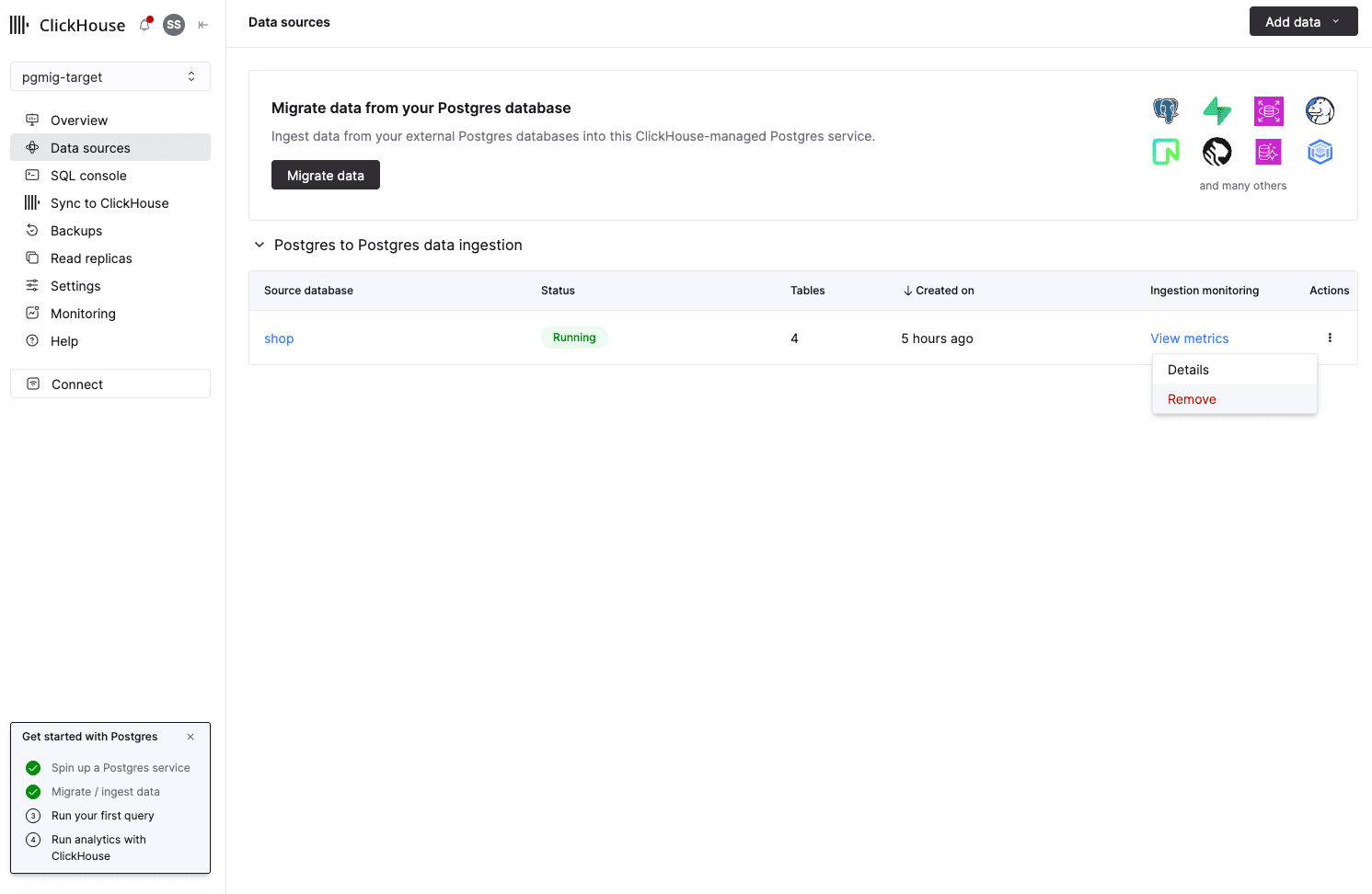
Then verify on the source that the slot went with it:
psql -h "$RDS_HOST" -c "SELECT slot_name, active FROM pg_replication_slots;"
psql -h "$RDS_HOST" -c "SELECT pubname FROM pg_publication;"
RDS must report no rows for the slot. Deleting the pipe against a reachable source drops the remote slot with it, which is what releases the WAL you watched pile up in module 03 Step 6. Do not take that on trust — checking is one query, and the failure it catches is the one that fills a disk days later with nothing left running that would explain it. If a slot is still there, drop it explicitly before you go any further:
psql -h "$RDS_HOST" -c "SELECT pg_drop_replication_slot('<slot_name>');"The publication does outlive the pipe, and that is fine. You will see one with a generated name
like peerflow_pub_mirror_de64e41d__…, which is how you can tell it was the pipe's rather than
yours. WAL is retained by slots, not by publications, so a publication with no slot behind it holds
nothing and costs nothing. Drop it only if you want the source left tidy:
psql -h "$RDS_HOST" -c "DROP PUBLICATION <pubname>;"Step 2 — Amend your runbook
Update runbook/cutover.md with the measured downtime and any missing steps.
Check sequence reset, verification, and abort criteria against the results from module 03 Step 6.
The model runbook, with the reasoning behind each line, is in the reference track. Read it now, against your executed one.
Compare transactional benchmarks
PostgresBench reports managed Postgres results for a pgbench TPC-B-like transactional workload.
Use its methodology and source code to inspect the test configuration.
Record instance size, region, high availability, Postgres version, working-set size, and workload before comparing results. A transactional benchmark does not establish dashboard latency or predict your workshop results. Module 06 measures your analytical queries and writer under concurrent load.
Completion checks
- The writer is committing against
$TARGET_HOSTwithfailedat zero; - Every sequence's
last_valueequals its table'smax(id); - Grafana renders all eight panels against
$TARGET_HOSTwith no panel SQL edited; - The reconcile check prints
reconciled; pg_replication_slotson RDS returns no rows; andrunbook/cutover.mdrecords your measured downtime and what you would change.
Next: module 05 streams the analytical copy from Managed Postgres into ClickHouse.