05 Stream the analytical copy to ClickHouse
Copy Managed Postgres data into ClickHouse with CDC and choose engines and ordering keys.
No downtime, no cutover, no runbook. The application keeps writing to Managed Postgres and the dashboard keeps reading it for the whole of this module.
cd "$(git rev-parse --show-toplevel)/workshops/postgres_migration"Outcome
The four shop tables continuously replicated into a ClickHouse service, initial load complete and
CDC caught up, with the engine and ordering key of each destination table chosen by you rather than
accepted by default.
Verify the dashboard
Open Grafana and confirm that all eight panels render against Managed Postgres. The dashboard still shares database resources with the writer. This module creates an analytical copy; module 06 routes queries to it and measures the result.
Step 1 — Create the ClickHouse service
This is a separate thing from the Managed Postgres instance you created in module 03 — that is Postgres, this is ClickHouse, and this module builds the pipe between them. Same region as both the Managed Postgres instance and RDS.
clickhousectl cloud service create \
  --name pgmig-clickhouse \
  --provider aws \
  --region "$AWS_REGION" \
  --min-replica-memory-gb 8 \
  --max-replica-memory-gb 8 \
  --num-replicas 1 \
  --idle-scaling true \
  --idle-timeout-minutes 15
Save the returned service ID and the one-time default-user password. Idle scaling matters for the bill: this service sits unused while you work through the rest of the module.
export CH_SERVICE_ID="<service-id>"
export CH_DEFAULT_PASSWORD="<one-time-default-password>"
clickhousectl cloud service get "$CH_SERVICE_ID"
Wait for a running status, then take the HTTPS endpoint hostname from that output — no scheme, no port. Module 06 needs it in exactly that form.
export CH_HOST="<clickhouse-service-endpoint-hostname>"Create the destination database and a read-only user for module 06's foreign data wrapper to connect as, without leaving the shell:
export CH_DATABASE=shop
export CH_USER=workshop
export CH_PASSWORD="Ch@$(openssl rand -hex 12)"
Q() { clickhousectl cloud service query --id "$CH_SERVICE_ID" --query "$1"; }
Q "CREATE DATABASE IF NOT EXISTS shop"
Q "CREATE USER IF NOT EXISTS workshop IDENTIFIED WITH sha256_password BY '${CH_PASSWORD}'"
Q "GRANT SELECT ON shop.* TO workshop"
Q "SHOW DATABASES"
Q "SELECT name FROM system.users WHERE name = 'workshop'"
printf 'CH_USER=%s\nCH_PASSWORD=%s\n' "$CH_USER" "$CH_PASSWORD" >> .env.local
SHOW DATABASES must list shop, and the last query must return one row naming workshop.
Keep the Ch@ prefix: ClickHouse Cloud requires an uppercase and a special character, which hex
alone does not have. The password goes to .env.local because module 06 needs it; make sure the file
ends up with exactly one CH_PASSWORD line.
The database has to be named shop. Module 06's sql/06_pg_clickhouse.sql maps a ClickHouse
database onto a Postgres schema — ClickHouse has no schema level, so its database is what
IMPORT FOREIGN SCHEMA names — and it passes shop as both dbname and the imported schema.
Step 2 — Create the ClickPipe
On your ClickHouse service — pgmig-clickhouse, not the Managed Postgres instance — open
Data sources, then ClickPipes → New. The flow is documented at
ClickPipes for Postgres; the
decisions this workshop wants you to make consciously are below.
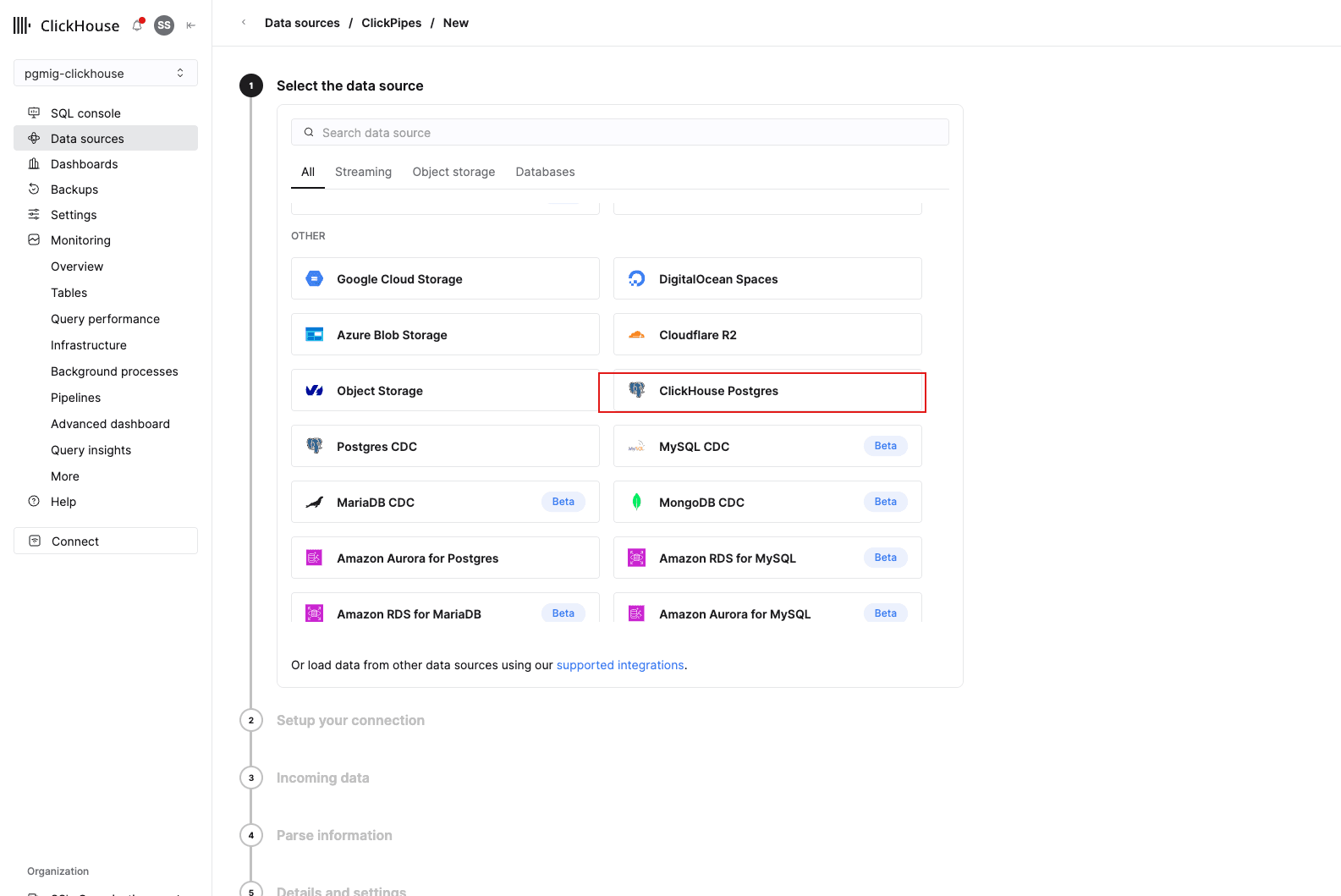
1. Select the data source
ClickHouse Postgres, under OTHER. Not "Postgres CDC" and not "Amazon RDS for Postgres" — those are for a self-managed or RDS source, and yours is a ClickHouse Managed Postgres instance.
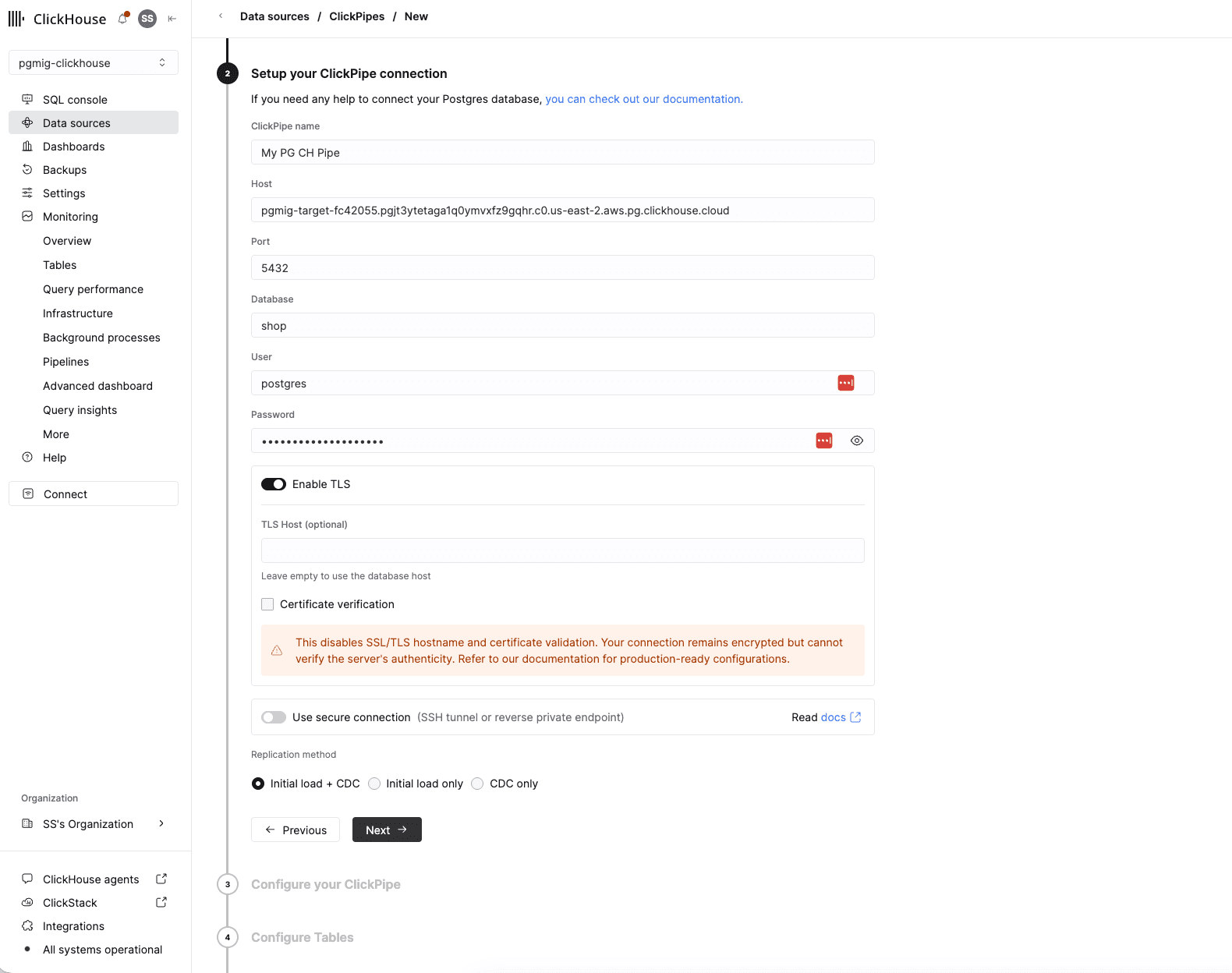
2. Connection, and the replication method
Host is $TARGET_HOST, port 5432, database shop, user postgres, password
$TARGET_ADMIN_PASSWORD — the Managed Postgres values from module 03.
Keep Enable TLS on and clear Certificate verification. The connection stays encrypted either way; clearing it skips validating the server's certificate, which the console warns about and which a production pipe avoids by uploading a root CA instead. Leave Use secure connection off and choose Initial load + CDC.
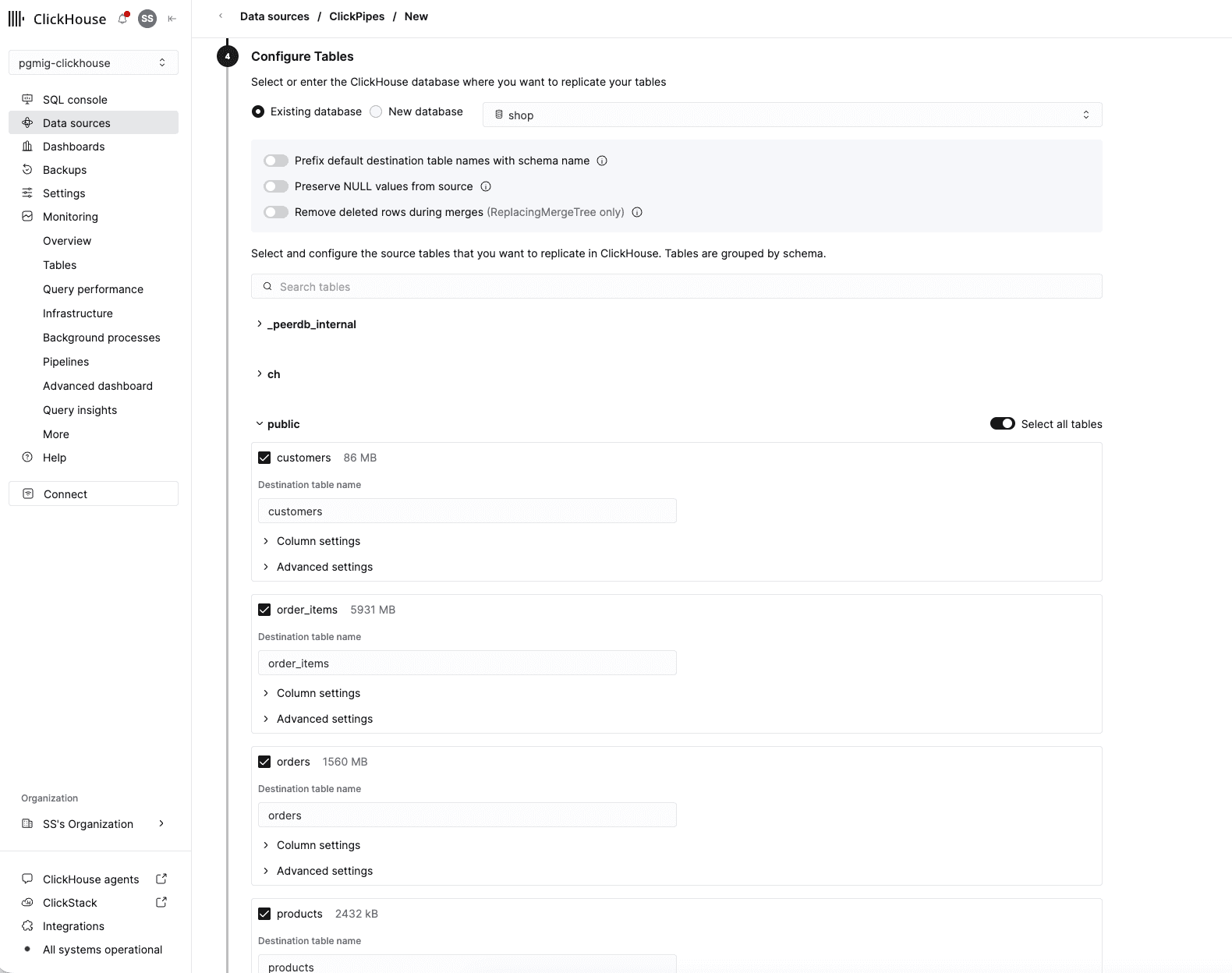
3. Configure tables
Choose Existing database and select shop — this screen is where the destination database is
set.
Turn off "Prefix default destination table names with schema name." Left on, the destination
tables are public_customers, public_orders and so on, and module 06 cannot use those:
IMPORT FOREIGN SCHEMA keeps whatever names ClickHouse has, every dashboard panel queries
FROM orders unqualified, and a foreign table called public_orders never matches. Off, the four
names are bare, which is what module 06 needs. Changing it afterwards means recreating the pipe.
Select the four tables under public, and nothing outside it.
Each table's Advanced settings carries the engine, which Step 3 explains. Leave the custom partitioning and sorting-key toggles off, and leave the three toggles above the table list off too.
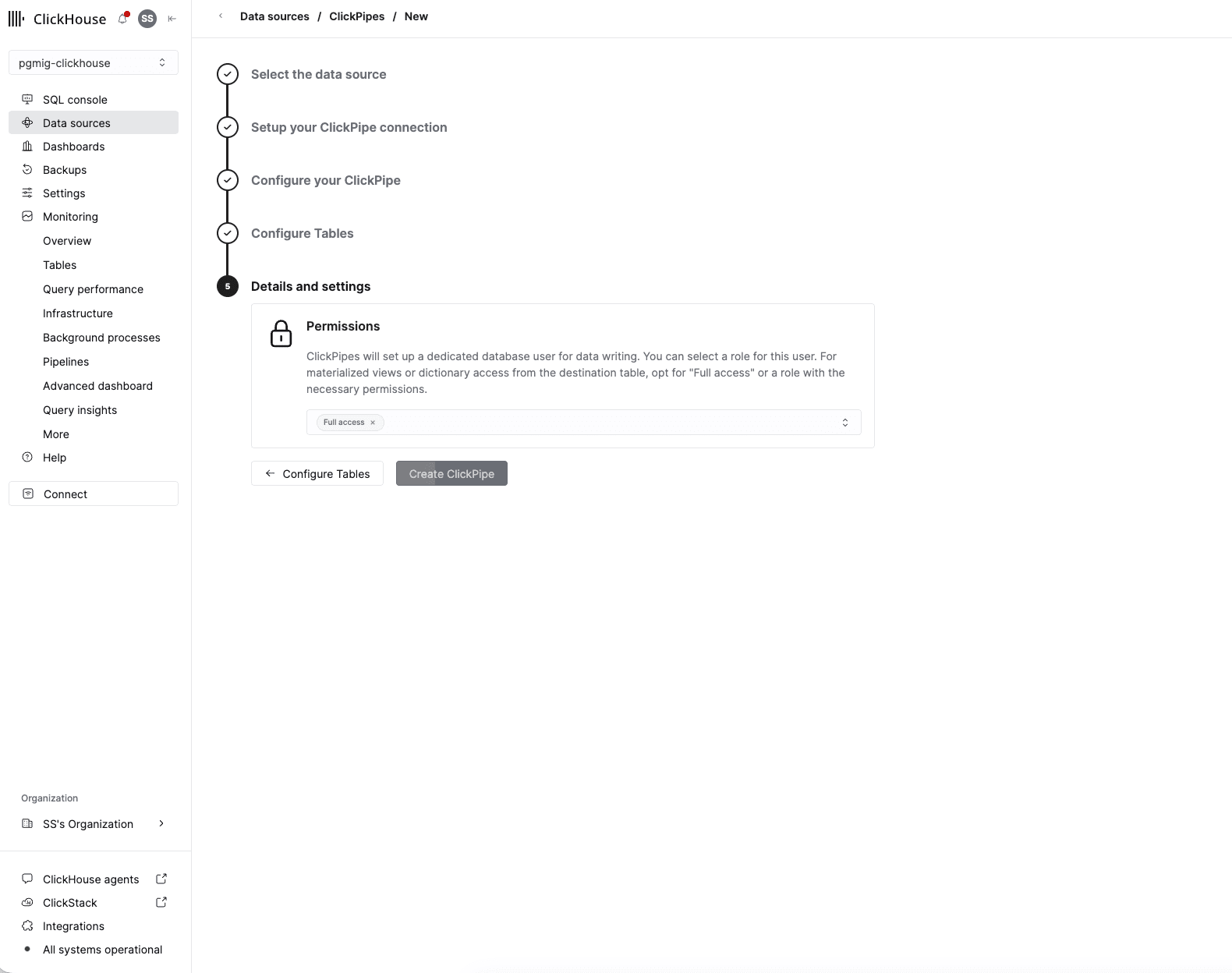
4. Permissions, then create
ClickPipes creates its own database user for writing. Full access is the choice that lets module 06 read these tables through a foreign server and lets a materialized view read them at all.
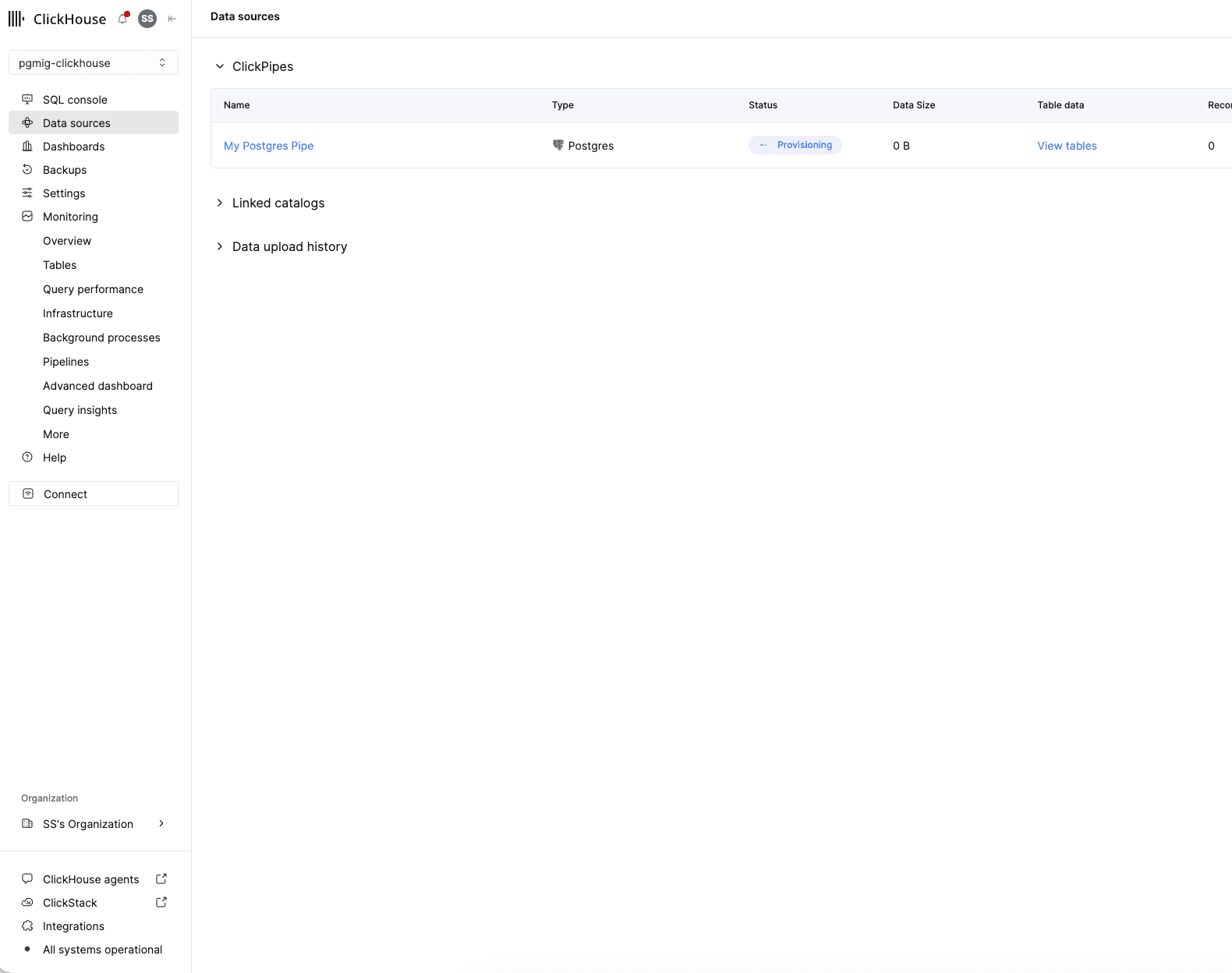
5. Confirm it was created
Data sources lists the pipe with type Postgres, a status that starts at Provisioning, and a
View tables link.
What the destination difference costs you
Set the destination database to shop, matching Step 1.
This is the same product as module 03's pipe with a different destination, and the difference is the substance of this module. A Postgres destination receives your schema. A ClickHouse destination needs an engine and an ordering key, because MergeTree has no primary key in the Postgres sense and an update is a new row rather than an overwrite. Steps 3 onward are those choices.
You are pointing it at Managed Postgres and not at RDS on purpose. Ask yourself why, and check your answer against module 01's "road not taken": pointing it at RDS is the shorter workshop, it works, and it leaves the write path on the slower engine and teaches no cutover.
This pipe creates its own publication and replication slot on the Managed Postgres instance — a second slot, on a different machine, doing a different job from the one you watched fill a disk in module 03. Everything you learned there applies here: it holds WAL on Managed Postgres for as long as it is paused, which is why module 07's teardown deletes it before deleting the instance.
Step 3 — Choose the engine and the ordering keys
This is the part not to click past. ClickPipes proposes a table definition per source table, and the two fields worth deciding rather than accepting are the engine and the ordering key.
Why ReplacingMergeTree for the mutable tables
ClickHouse has no in-place UPDATE in the sense Postgres does. A CDC stream of Postgres UPDATE
and DELETE statements therefore cannot be applied as updates; it is applied as inserts of new
versions, and something has to decide which version wins at read time.
ReplacingMergeTree is that something: rows sharing the same ORDER BY tuple collapse to one
during background merges, keeping the newest by the version column. ClickPipes uses a
_peerdb_version-style column for that and adds a soft-delete marker so a Postgres DELETE
becomes a row that queries filter out rather than a row that vanishes.
Which of your four tables actually needs it:
| Table | Mutated in this workshop? | Engine |
|---|---|---|
orders | yes — status and updated_at change after insert | ReplacingMergeTree |
customers | in principle — a customer record is editable | ReplacingMergeTree |
products | in principle — unit_price changes | ReplacingMergeTree |
order_items | no — append-only in this schema | ReplacingMergeTree, still |
Use ReplacingMergeTree for order_items as well. The lab writer only inserts rows, but other clients could update or delete them.
A plain MergeTree destination does not resolve CDC versions of mutable rows.
The ordering key, and the constraint that decides it
ReplacingMergeTree deduplicates within the ORDER BY tuple. That is not a tuning knob; it is
the correctness contract. If the key is not unique, distinct source rows can collapse together.
If a key column changes, versions of the same row can remain in different tuples.
So the ordering key must contain the source table's primary key. ClickPipes defaults to exactly that, and the default is right:
| Table | Ordering key |
|---|---|
customers | customer_id |
products | product_id |
orders | order_id |
order_items | order_item_id |
Now notice the tension, because it is the real lesson. Every panel query filters on placed_at:
WHERE placed_at >= now() - interval '90 days'A ClickHouse table ordered by order_item_id has a sparse primary index that is useless for a
placed_at predicate, so those panels read the whole part range and filter. The ordering key a
query planner would want is (placed_at, order_item_id) — time first, granularity second.
Leading with placed_at is safe only if placed_at never changes
for a given row, because a row whose ordering-key value changes moves to a different tuple and
stops deduplicating against its own earlier version. In this schema order_items.placed_at is
copied from the order at insert and never updated, so (placed_at, order_item_id) is in fact
defensible for that one table — and orders.updated_at is not, and orders.status certainly is
not.
Decide per table, and write your reasoning down:
- Is every column in my proposed ordering key immutable for the lifetime of the row? If no, choose immutable columns before tuning query performance.
- Does the key still contain the primary key? If no, dedup is broken.
- Do my read patterns filter on the leading column? If no, the index is decoration.
For this workshop, take the ClickPipes defaults for customers, products and orders, and make
the deliberate choice on order_items. Whichever you pick, you will see its consequence in module
06's EXPLAIN output and in the after-benchmark, which is the point of choosing rather than
accepting.
If you took the defaults everywhere
That is a defensible answer and the workshop still works. Note it in your notes as a default you accepted rather than a decision you made — the difference matters when the table is a customer's and the ordering key is not changeable after the fact without a rebuild.
Step 4 — Watch the initial load, then the handover to CDC
Start the pipe. It snapshots each table, then switches to streaming from the slot it created.
Record the initial-load duration. Keep the writer running and monitor per-table progress until CDC starts.
The ClickPipes overview page shows per-table progress and, after the snapshot, an ingestion rate. Corroborate it from ClickHouse rather than trusting the console:
SELECT table, sum(rows) AS rows, formatReadableSize(sum(bytes_on_disk)) AS on_disk
FROM system.parts
WHERE database = 'shop' AND active
GROUP BY table
ORDER BY table;
Compare against the source:
psql "$TARGET_DSN" -c "SELECT
  (SELECT count(*) FROM customers)   AS customers,
  (SELECT count(*) FROM products)    AS products,
  (SELECT count(*) FROM orders)      AS orders,
  (SELECT count(*) FROM order_items) AS order_items;"
The two will not match exactly while the writer is running, and they should not: CDC has latency, and the writer commits about 200 orders a second. What must be true is that the ClickHouse counts track the Postgres counts with a small, stable gap rather than a growing one.
Then prove CDC is live rather than merely that the snapshot landed. On Managed Postgres, place a known change and find it:
psql "$TARGET_DSN" -c "UPDATE orders SET status = 'refunded', updated_at = now()
  WHERE order_id = (SELECT max(order_id) FROM orders) RETURNING order_id, status;"
Then in ClickHouse, a few seconds later:
SELECT order_id, status, updated_at
FROM shop.orders FINAL
WHERE order_id = <the-order_id-just-returned>;
FINAL applies deduplication at query time. For mutable rows, also exclude records marked deleted.
Without deduplication, analytical queries can include multiple versions of a row.
The lab panels omit FINAL, so their results may include duplicates before merges complete.
For exact results, choose a CDC deduplication strategy and measure its query cost.
Also check the replication slot the pipe created, on the Managed Postgres side, so you know what you are now responsible for:
psql "$TARGET_DSN" -c "SELECT slot_name, active,
  pg_size_pretty(pg_wal_lsn_diff(pg_current_wal_lsn(), confirmed_flush_lsn)) AS behind
  FROM pg_replication_slots;"
active must read t and behind must be small and stable. A pipe you pause and forget does the
same thing to this instance's disk that module 03's paused pipe did to RDS's.
Step 5 — Look at what you now have, and what you do not
Two engines, one dataset, and a dashboard that still queries the row store.
SELECT count(), formatReadableSize(sum(bytes_on_disk))
FROM system.parts WHERE database = 'shop' AND active;
Run one panel's SQL by hand against ClickHouse to see what the column store does with it. This is ClickHouse SQL and the panel's Postgres SQL happens to be close enough to run as-is:
SELECT toStartOfHour(placed_at) AS hour, sum(line_total) AS revenue
FROM shop.order_items
WHERE placed_at >= now() - INTERVAL 7 DAY
GROUP BY 1 ORDER BY 1;
Record this query's runtime as an interactive check. Compare performance only with the concurrent-load harness in module 06.
Grafana still queries Managed Postgres. Module 06 routes its existing SQL through pg_clickhouse to the analytical copy.
Continue to module 06 after verifying the initial load and CDC.
Completion checks
- A ClickHouse service exists in the same region, with a
shopdatabase and aworkshopuser holdingSELECT; - A Postgres CDC ClickPipe runs from Managed Postgres to that service, over the four tables;
- The initial load has completed and
system.partsshows all four tables populated; - An
UPDATEmade on Managed Postgres is visible in ClickHouse within seconds viaFINAL; - The pipe's replication slot on Managed Postgres reads
active = twith small, stable lag; and - You can say, per table, which engine and ordering key you chose and why — including whichever ClickPipes defaults you deliberately kept.
Next: module 06 routes the dashboard's existing SQL to those ClickHouse tables without editing the dashboard, proves it three ways, then finds the one panel that does not push down and repairs it.